Send Free SMS Mobile Using Yahoo Widget

To send free SMS from computer to mobile device you can use the Yahoo Widget. The system offering the user to send free text message (SMS) by collaborating with callwave services.

To start sending free SMS from your computer or laptop to mobile or hand phone of course you have to connect them to the internet first, And then download some application.

OK, Right now I will guide you how to get free send SMS mobile using the Yahoo Widget. The Yahoo Widget is a software system that work as JavaScript Runtime Engine in the Windows and Mac OS X which allow you to run small file called "Widgets".

You need to install Yahoo Widget software on your computer, It will help you to use callwave service in order to send free SMS from computer to mobile device. When you have done create both of them on your computer, You can freely send SMS message to any of mobile provider from around the world.

SMS message will receive in minutes by the owner of mobile. So, for the internet user those want to send free sms mobile by online without cutting their mobile's balance they can try following these steps :

  1. Download Yahoo Widget file name widgetus.exe size 11.7 MB.
  2. Install in your computer, Run the application when it is finish
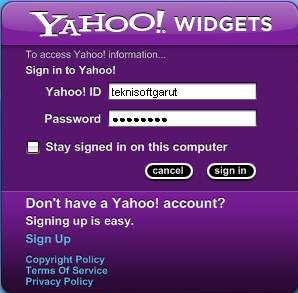
  3. Start Login using your Yahoo ID
  4. To get continuing send free SMS mobile using Yahoo Widget, download Free Text Message file (widget) from Callwave (you can chose new version). Save the SMS application to your computer directory such as My Documents or My Widget, then double click on it.
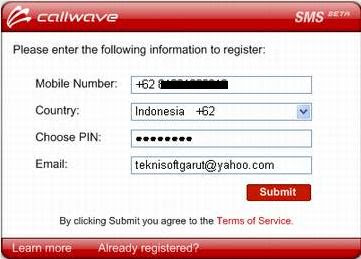
  5. Before you start send SMS, you need to register first. It is free! Simply just click on register button.
  6. Enter your mobile number, country, e-mail address (don't wory, it's just to get your PIN number to verify your registration only)
  7. Submit them to verify you ID member
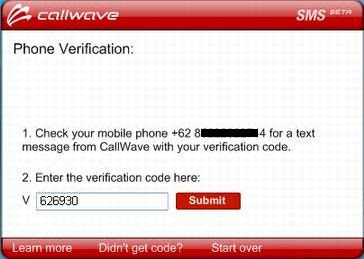
  8. Do the verification with your PIN number that has send to your mobile number.
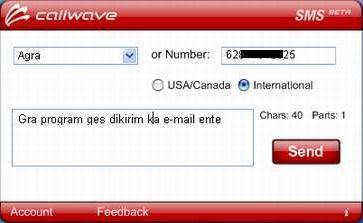
  9. Enjoy to send free SMS mobile from your computer now
With these system you can send free SMS text message to mobile device to many gateway provider service such as to Indonesia (Indosat ;IM3/m3access, Mentari - Telkomsel; Simpati - XL; pro XL) United State (USA), United Kingdom (UK), Middle East (Kuwait ; MTC - Wataniya, Qatar, Oman, Emirates/Abu Dhabi/Bahrain, Saudi Arabia), India, Singapore, Malaysia, China, and more others countries.


Source : This article is translated from http://dedekurniadi.web.id/2007/06/04/kirim-sms-gratis-via-komputer-dengan-yahoo-widget/.

Send Free SMS to India, Kuwait, Singapore, UAE, Saudi Arabia, Philippines and Malaysia

Now You Can Send Free SMS to India, Kuwait, Singapore, UAE, Saudi Arabia, Philippines and Malaysia using 160by2 services. 160by2 is a SMS Marketing service launched in India which allows the users to send Free SMS messages through their website.

By using 160by2 online service the members can send free SMS of 80 characters, Right now they have Over 4 Million Registered Users who always comeback to send free SMS from PC to mobile device to the countries India, Kuwait, Singapore, UAE, Saudi Arabia, Philippines and Malaysia.

It is free service, You need to register to have an account member before you can send free SMS. On successful registration, you shall receive a "password" on your mobile (with which you have registered).


After that, simply Login to your account at 160by2 with your password and user name. And then you can start sending FREE SMS, The system will allow you to send maximum of 50 messages per day. You can send only 10 messages to one particular number in a day.


  • To send free sms messages to India, fill the form with 10 digit mobile number in the mobile number box and type in your text message in the message body input area.
  • To send free sms to Kuwait, use of country code (965) followed by 8 digit Kuwait mobile number (Wataniya or MTC provider). for example : 965xxxxxxxx
  • To send free sms to Singapore, prefix mobile number with country code 65 followed by 8 digit Singapore mobile number and type in your SMS text in the message body input area. for example : 65xxxxxxxx
  • To send free sms to UAE, please use the mobile number with country code 971 followed by 9 digit UAE mobile number. for example : 971xxxxxxxxx
  • To send free sms to Saudi Arabia, put the country code 966 followed by 9 digit Saudi Arabia mobile number. for example : 966xxxxxxxx
  • To send free sms to Philippines, please prefix mobile number with country code 63 followed by 9 Or 10 digit Philippines mobile number. for example : 639xxxxxxxxx
  • To send free sms to Malaysia, enter the mobile number include of country code 60 followed by 9 digit Malaysian mobile number. for example : 601xxxxxxxx

Enjoy your day and save your money by sending free SMS PC to mobile device from 160by2 service.

Make 100% free calls to INDIA or any country from PC, iPhone or Android

Today we will discuss a trick to make 100% free calls to INDIA or any other country. This requires a simple registration without any credit card or sensitive information.

Last year we have published article on CallArc.com about their free international calling service. At the time of launch they included limited number of countries in there service list. Now today they included support for almost all countries for free calling, Including INDIA.

But wait there are some restrictions by CallArc.com like if you register your INDIA mobile number then you will not be able to call any INDIA number for free.

So follow steps below to make free calls to INDIA or any other country

STEP 1: Register with CallArc.com for free.
STEP 2: Login to your account and now setup your phone number, access number and pin (setup your US number/Google Voice number/ any other online number)
STEP 3: Go to Contacts page and add the number you want to call
STEP 4: Now go to this page and download the application for your iPhone, Android or PC. Now enter settings given on that page after the launch of application
STEP 6: Call you Local Access number/online number and select the person name you want to call as per you contact list

Now you will hear a small advertisement and then your call will be connected. If you want to talk unlimited in any callback country then follow the steps given in our previous CallArc post, but that will cost both parties local call.

General SIP settings for Call Arc

Username: your user name
Password: your password
Server: sip.callarc.com
Port: 5060

FREE International Mobile Phone Call: Try Now

Operator One
Just register free with Operator One and make free & smart trial international calls worth one Euro, no fine prints,

Operator One.eu is a Luxemburg based cheap phone calls provider to the world, they have a technology (like Rebtel.com perhaps) that one can make ultra low cost phone calls using ANY (and not the only smart phones) cell phone, around the world, thus could save a significant 98% money in hefty international calling using Operator One,

Nothing to download, no VOIP, SIP settings, PC or broadband ever needed, just your ANY ordinary cell phone (mobile) with your existing SIM and you are fine to go : )

Operator one claims that their overseas calling is even cheaper than SKYPE the VOIP giant, as their international calls starts only from GBP 0.02 per minutes onwards,

Operator One says that after doing a free registration (which is very quick) they will give away 1 euro free bonus to anyone to make use for your first call as a trial call so you don’t have to spend even a penny to test the honest, genuinely or the international call quality from your mobile phone,

Further, after the free trial call, if you like Operator One pricing and call quality with ease of access, you can add your international contacts with their phone numbers, and than Operator one will provide you a new local number for each of your international contact,

...Thus your each and every call will be a local phone call to make you enabled to talk more and more every time, but you also have to pay the local call charges to your service provider like always apart from low cost international calling rates to Operator One, and all this just from your cell phone, forget PC to PC calling or such, this is best and easy part for a layman,

Yeah if you add some balance or credit to your account Operator One gives you free / additional amount as a bonus, time to time as their promo schemes,

Operator One low cost mobile phone call provider is a network independent international operator,

They are modern in communication tech but still they have an easy to use communication services, their service Operator One Connect, make us enable to make mobile phone calls to our international contacts and friends on a local phone number, from ANY phone, and thus making all international calls as the local calls,

... yeah we always can keep our existing or current mobile phone, operator and subscription etc with us, nothing has to be changed or give up,

They also provide for a dedicated local number (DID numbers) in many cities / countries of the world which starts only from few Euros a month like €3 or so,

Countries from where the Cheap International Calls are permitted with Operator One:

You can call to the world using Operator One mobile cheap call services but calls can only be initiated / made from a few European, American, Australian nations which also includes, the Japan, and Israel etc,

Argentine, Australia, Austria, Belgium, Brazil, Bulgaria, Canada, Chile, Croatia, Czech Republic, Denmark, Finland, France, Germany, Greece, Hungry, Ireland, Israel, Italy, Japan, Latvia, Lithuania, Luxemburg, Mexico, Netherlands, Norway, Poland, Romania, Slovakia, Slovenia, Spain, Sweden, Switzerland, United Kingdom and United States

FYI: For the EuroBonus members: They can earn EuroBonus extra points if you are calling with Operator One as they say that they are the first EuroBonus partner who specializes in international phone calls,

Free Promo for May 2010:

Add 10 EUR or more to your Operator One account and they will give you 5 EUR extra – for free! (This offer is valid once per customer and only during May 2010),

To receive 5 EUR extra, you should have an Operator One account > then sign in to it and go to the Payments page > Add 10 EUR or more to your account using your credit card or PayPal > Your spring time bonus will be added automatically….

Sign up below for free and get free trial international calls worth one Euro (no obligation):

Operator One

Make Google Voice Phone Calls From Any Country

How to Get & Use the Google Voice Call Phone Button Anywhere in Any Country?

Google Voice: Google's Free Telephony!

As we know that Google Voice is a telephone service from Google Inc. which gives free phone calls / SMS in US & Canada, but this free phone service only is available to the residents of US and Canada and not to the international countries,

Google Voice provides for a free lifetime US phone number and one number rings all of your phones which are connected or linked with the number,
The Google Voice app is also available for free in Apple iTunes store for a download on Apple (iOS) iPhone, iPod Touch, or iPad,

But here is a website: Allurewebsolutions.com which claims that any one can get the Google Voice call phone button in any country of the world and is NOT limited only to the US/Canada residents,

(they are selling their 'solution' for GBP 10, but we can not confirm this claim to be true, as we had not tested this claim, so if you are going to buy this, please do at your own peril),

They say that using this Google Voice solution the internationals would be able to make calls of Google Voice and they do not need to be in the USA or Canada, in-particular they seems to be selling their GV service to the UK users! We hope this works!

Free Phone Calls With iCall

iCall is one of the better ways to make free Internet phone calls.
iCall is a "traditional" free phone call application. You just download the software, log in, and make free calls to real phones.

iCall Software - Free Phone Calls With iCallTypes of Free Calls With iCall:

iCall can be used to make free PC to phone calls.

Download iCall and Create a Free Account:

You can download iCall for free here.
Once downloaded, install the program, run it, and click the Signup for your free account button on the program's main window.

How To Use iCall:

Making free calls with iCall is very easy. Just start the program and log in. After iCall connects, dial the number you want to call from the Dial tab and then click Place call.
After clicking Place call, a short (around 10 seconds) advertisement will play. When that's over, iCall will connect you to whatever number you dialed - for free.
You can also make free calls directly from the iCall website, meaning you won't have to download or install any software. However, calls are limited to three minutes using this interface.
A free iCall iPhone app is also available.

iCall Free Call Limits:

Free calls made with iCall are limited to a five minutes in length, at which point you'll be disconnected. However, you're free to call the same number over again as many times as you like.
Also, calls made with any iCall interface are free only if you call numbers based in the United States or Canada. Calls to numbers outside the US and Canada will cost you, but usually not much.

iCall Review:

I think iCall is great, mainly because it's so easy to use. My biggest issue with iCall is that the free call time limit is only five minutes. Granted, many phone calls are short, but compared to the three hour limit of Google Voice, five minutes seems incredibly short.

Free Phone Calls With Google Voice

As of this update, Google Voice is the best way to make free Internet phone calls.
The Google Voice service is more of a "phone number management" service than a typical Internet phone service so it does a lot more than let you make free phone calls. Still, if all you want to do is to make free phone calls, Google Voice is your best bet.
Google Voice was formally known as GrandCentral.

Types of Free Calls With Google Voice:

Google Voice can be used to make free PC to phone calls and free PC to PC calls.
The easiest and most common way to use Google Voice, however, is to allow the service to connect your phone to the destination number for free. I suppose you could call this a free "phone to phone" call.

Sign Up for Google Voice:

You can sign up for Google Voice for free here using your Google Account, the same information you use to access other Google services.
Click on the Get a Google Number button to get your free phone number so you can start making free phone calls!
Google Voice is only open to those in the US.

How To Use Google Voice:

To use Google Voice to make free phone calls, log in to Google Voice and click the Call button. Enter a US or Canadian number in Number to call, choose a Phone to call with (this is your home or mobile number you told Google about when you signed up), and then click Connect. Google will dial the number you entered and connect the call to you for free.
To use Google Voice to make free PC to phone calls, install the Google Chat video and voice plug-in here. Once installed, you can make free calls from Gmail to real phones using just your PC microphone and speakers.
Google Voice can also be used to make PC to PC calls, often called voice chat, using Google Talk available here.
You can also use Google Voice as a web app from mobile browsers, as shown in the screenshot above. Official Google apps are available for Android, BlackBerry, and iPhone users.

Google Voice Free Call Limits:

Free calls made with Google Voice are limited to three hours in length, at which point you'll be disconnected. However, you're free to call the same number over again as many times as you like so this is more of an occasional annoyance than a restriction.
Also important to know is that calls with Google Voice are free only if you call numbers based in the United States or Canada. Calls to numbers outside the US and Canada will incur a small per-minute fee.
PC to PC calls using Google Voice are not restricted.

5 Ways to Make Free Internet Phone Calls

It is true - you can make free phone calls using the Internet! Free internet phone programs let you make free phone calls, usually only to the US and Canada, using special software.
Most of the free phone call applications I list below are PC to phone programs, meaning you can make a free call from your computer to a real telephone number so you don't even need a telephone yourself. Some of the other free internet phone programs will connect your real phone to another real phone for free, making a long distance plan unnecessary.
No matter how it works, it's a free call!

To make a free call using an Internet phone, you might have to download free phone call software or use a soft phone from an Internet phone provider website.
Important: A free Internet phone can not be used to make a 911 or similar emergency call. If you need to call 911, use a traditional land-line or mobile phone, or a VoIP telephone service that's approved for 911 use like Vonage.

1. Google Voice

Google Voice - Free Internet Phone Calls
As of January 2011, Google Voice is the very best way to make free Internet phone calls. With Google Voice, you can make free phone calls, free PC to phone calls (via Google Talk browser plugin), and free PC to PC calls (also via Google Talk).
Google Voice is much more than a way to make free phone calls on the Internet. Google Voice is primarily a way to manage the phone numbers in your life and can be used to intelligently route incoming calls to your free phone number provided by Google Voice to any other phone you have. With Google Voice, you can also get free SMS, make a free conference call, and get free voice mail services.
Free calls you make with Google Voice must be to numbers in the United States or Canada.
Google Voice is available as a web app that you can use in any browser, including mobile browsers (as pictured here). Dedicated apps are available for Android, BlackBerry and iPhone users.
Free phone calls with Google Voice are limited to three hours. However, you can continue to make a free call to the same number again and again.

2. iCall

iCall - Free Internet Phone Calls
iCall is another tool you can use to make free internet phone calls. With iCall, you can make free calls from PC to phone using their free software.
The computer that you make calls from can be anywhere in the world but for the call to be free, the number you call must be in the United States or Canada. You can't make free phone calls using iCall if you're calling outside the US or Canada.
iCall is available as a free desktop application for Windows, Mac OS X, or Linux and as a free iPhone app. Free phone calls will be disconnected after a short five minutes but you can call the number back again as many times as you want. You will also hear an advertisement before each call that's around ten seconds long.
A flash-based version of iCall is also available on their website but free calls here are limited to three minutes.

3. Freebuzzer

Freebuzzer - Free Internet Phone Calls
Another Internet phone that can be used to make free phone calls is Freebuzzer.
Freebuzzer works a lot like Google Voice in that it connects your phone with the phone number you dial. Your free call is limited to a very short two minutes and you can only make three free calls per day.
The good news is that free phone calls with Freebuzzer can be made to over 40 countries. Since most Internet phones restrict free calls to the US and Canada, Freebuzzer might be your only bet for free calls to certain countries.

4. EvaPhone

EvaPhone - Free Internet Phone Calls
EvaPhone is yet another way to make free Internet phone calls. EvaPhone lets you make free, but incredibly short, PC to phone calls all from a Flash-based interface right on their website.
What makes EvaPhone unique is that you can call nearly any phone in the entire world for free. Another thing that makes EvaPhone unique is how incredibly short that free call is. Free calls range from ten seconds to one minute in length, depending on the destination. You're also also limited to just two calls per day.
After dialing a number on EvaPhone, you'll watch a short video advertisement and then your free call will begin. A countdown timer will begin so you know when you'll be disconnected.
I certainly don't think EvaPhone is the best way to make a free call on the Internet, but if you need to tell someone something fast, don't have your own phone, and don't want to pay for the call or download software, EvaPhone might be the perfect free Internet phone for you.

5. Tuitalk

tuitalk - Free Internet Phone Calls
Tuitalk is another Internet phone that works much like EvaPhone. With Tuitalk, however, you have to download their free Internet phone software.
Tuitalk lets allows you to make free phone calls to around 40 countries. Each country in which you make your free phone call is limited to a certain number of minutes per call and per day. For most countries, your free Internet phone call can be six minutes in length.
Before your free call with Tuitalk is connected, you have to watch several seconds of a high-quality video advertisement.

Free PC to PC Phone Calls

I compiled this list of ways to make free Internet phone calls assuming that you're looking for ways to call "real" telephones. However, if you're only interested in free PC to PC calls, several programs can do that.
A few of the many programs that offer free PC to PC calls that I didn't already mention above include Skype, Yahoo! Voice, and Windows Live Messenger.

Make Free Internet Phone Calls Copyright © 2011 -- Template created by O Pregador -- Powered by Blogger