Showing posts with label free calls. Show all posts

Nimbuzz Voip Application For Blackberry

      VoIP calling for BlackBerry – Nimbuzz Voip Application For Blackberry
The welcome alliance between renowned names in the field of smart phones and Voice over internet protocol (VOIP) vendors signals the dawn of a new era of low cost voice calling and messaging.  The Canada based RIM (Research in Motion) groups Blackberry mobile smart phones has formally tied knot with Nimbuzz, a trendsetting VOIP mobile app. Blackberry is a favorite choice for people across the world with its variegated models and is preferred especially by Business Class for the versatility in functioning it provides. Nimbuzz, the popular mobile app for low cost voice calling and messaging cuts across international boundaries and has been effective to keep people connected through its VOIP platform. Nimbuzz VOIP on mobile service commingles internet with mobile communication whose effect cascades to general public in the form of free phone calls or low cost voice calling and messaging to stay connected with people residing anywhere on the globe.
Nimbuzz is providing low cost voice calling and messaging services on BlackBerry 9700 Bold & Blackberry Curve 8520. This will redefine life for the devotees of these handset models with the aspect of savings now added. The latest RIM sets can now be used for making Nimbuzz free phone calls. The free calling service will be in effect for Nimbuzz to Nimbuzz, Yahoo, Windows Live/MSN and Google Voice platforms.
Strengths of RIM
Blackberry, too has been known for keeping its server inscription very secured and it is not vulnerable enough to be cracked. RIM has secured messaging and this brings it head on with many countries across the globe like India, UAE etc. These countries faces a setback from RIM over server encryption issue which hinders them from getting access or even keeping the servers in their respective places. Blackberry’s success can be attributed to RIM’s sturdy policies which mean no compromise on the technological arena.
Highlights and benefits
The integration of Nimbuzz app on BlackBerry 9700 Bold & Blackberry Curve 8520 models brings a host of benefits for Blackberry lovers.
The below points try to spell out a few of them:
  • Get together all your friends under one roof, the Nimbuzz platform. Remain updated of their status changes and chat limitlessly from your buddy list.
  • The integration of app into Blackberry user interface has made the usability of this app for low cost voice calling and messaging further streamlined.
  • The inbuilt technological add-on of The Home Screen alerts enable Nimbuzz app to continuously run in the background and this in turn ensures that not even a single call escapes your attention.
  • Sound profiles option allows you to customize the notifications in variegated forms lending a personal touch to mobile connectivity.
  • The Auto reconnect feature is handy for hopping in between 3G, 2G and Wi-Fi networks.
  • Text messaging is going to be forever free with the amazing Nimbuzz free messaging service, meaning more savings.

iCall: make free, ad-supported phone calls in the US and Canada, right from your desktop or device


iCall Screenshot1Would you like to dial any number in the US or Canada from anywhere and talk absolutely free? Would you like a way to be reached at your desktop anywhere in the world via a regular (US) phone call?
Now you can. The free version of iCall will let you dial any number right from the desktop and speak, Skype-style, via your computer’s built in Mic and speakers. iCall is available for Windows, as a web app, and for iPhone/iPad.
But there is a catch: iCall is ad supported; you will have to listen to a brief 30 second ad before you can make your call. Each call, moreover, can last up to 4:30 minutes before you have to re-dial (and listen to another ad), which is not an insignificant amount of time. The free version also does not afford you the luxury of having your own number, although people are able to call you by calling a centralized number and entering your iCall extension. iCall also provides voice messaging, so you know who called you while you were offline.
I tested this software just for the heck of it, by calling my own home. I will say there is something really cool about being able to call any ‘normal’ number free from the desktop. Here are some observations:
  • You can call almost any number in the US or Canada, including 800 numbers. You can also do so even if you are located outside the US or Canada.
  • You cannot make emergency phone calls
  • Ads are played before connecting your call and last 30 seconds.
  • You have 4:30 minutes of calling time available before having to redial (because the 30 second ads cut into your talking time).
  • Voice quality is very decent, despite a slight delay. It will depend on the strength of your connection of course.
  • You do not have your own number in the free version; however people can call you by using a local access number and theb keying in your iCall extension. See their list of local access numbers.
  • Other services include: a contact list and access to a voice messaging system, which I didn’t test myself.
  • This software can remain in the background, in order to receive calls whenever they might come. It has a memory footprint of just under 40 megs, which is not lightweight but not top heavy either.
  • You will be asked to create an account with a valid email address.
Differences from the paid version: the paid version is ad-free, promises better voice quality, no time limit on calls, call forwarding to your phone, and personalized voice messaging.
The verdict: a great service overall that works remarkably well. Not only does it give you the power to call anywhere in the US or Canada for free, but a way to call a US number from anywhere in the world. And a way for people to get in touch with you by making an ordinary US phone call, no matter where in the world you are.
If I wanted to pay for this sort of service, I would probably do it with Skype (since everyone I know is already using it), but I say kudos to the developers for finding a way to provide this service free of charge, even if it is ad supported.
Version tested: 4.0.0.22
Compatibility: Windows, browser based web app, iPhone and iPad versions available.
Go to the program home page to download the latest version (approx 5.35 megs).

enjoy ^_^

Google Voice Review


Google Voice is a revamping of the GrandCentral service that Google acquired in 2007. It aims at allowing users to manage their communication channels better, through Unified Communications. Google have reworked the service that GrandCentral once offered, with many improvements and features.

Bottom Line

Google Voice gives you a local phone number, of your choice, which can call up to six phones simultaneously. These can be your office phone, mobile phone, mobile phone, SIP phone etc. The cost of international calls in among the most competitive. Google Voice has also added more features, like voice to text transcription of voicemails and call recording, among others. On the downside, two of the main things to note is that it is more focused on incoming calls and as a result, many features don’t work with outgoing calls; and you cannot port your existing number to Google. On the whole, it is a nice service of which everyone will want to have an account (just like Gmail), especially since it is free.
Pros
  • Unified communications through one single phone number.
  • Voice to text transcription of voicemails.
  • Free calls to the US. Competitive rates for outgoing international calls.
  • Free service, open to anyone.
  • Many interesting features, including call recording, conferencing etc.
Cons
  • Existing phone number cannot be ported to Google Voice. (Update: this is changing soon)
  • Available only for users in the US, as calls cannot be forwarded abroad.
  • Outgoing calls cannot be recorded.

Review

The greatest thing about this service is the possibility to unify your communication needs – be called on different phones through one single phone number. Upon registration, you get a phone number from Google, which your contacts can use to call up to six of your phones and contact channels. Configuration, like forwarding etc. can be done on your phone itself.
The cost is interesting. Outgoing calls to US numbers are free. This is an improvement on GrandCentral, which only allowed you to receive calls. You can use the Google Voice service to make international calls to mobile and landline phones at very competitive rates. These are among the cheapest in the industry, hovering around a couple of dollar cents per minute for popular destinations.
The other great thing about the service is voice transcription. Google Voice is to voicemail what Gmail is to email. Google Voice transcripts your voice messages into text messages, allowing you to read them. This means that you no longer have to listen to the voice messages in order – this requires some patience, doesn’t it? You don’t even need to listen to them at all if you don’t want to. Treat them as text messages. This also implies that you can search, sort, save, forward, copy and paste the voice messages. Now, the big question on the efficiency of voice-to-text transcription arises. As you know, since human speech is so varied in accent, pronunciation and intonation, ambiguity always arises during transcription. While certain errors can be tolerated, others might turn a whole world upside down. Imagine ‘can’t’ being written as ‘can’! This is something to bear with.
You can have call conferences with the service. Up to 4 persons can talk at the same time. That is, you have to get the four persons call you and they can all be housed into the call.
The call recording feature is very nice. By pressing a single button (digit 4) on an incoming call, you can start the recording of the call, and stop it on a new press of the same button. This is great for business people and especially podcasters. However, since the service is more focused on the incoming side of calls, recording outgoing calls isn’t possible (yet?).
This service gets you started with a brand new number, and, inconveniently for some, you cannot port your existing phone number to it. Those who have been building up habit, trust and reachability upon one number will have to leave that number behind if they switch to Google Voice. (Update: this is changing soon, as Google is working on number portability)
Also calls cannot be forwarded beyond the US, and it works only with numbers in the US. This is a major limitation, and I hope the service gets extended to the whole world.
Other features include the screening of callers, listening before taking a call, call blocking, sending and receiving SMS, voicemail notifications and other related features, directory assistance, group management, and call switching.
In order to get a Google Voice number, you need to request an invitation. Go to the Google Voice invitation page and submit your email address. Some time later, you will receive an email requesting you to register. As I write this, only US residents are being given numbers. Google say they are working on numbers for other people.
Visit Their Website

Free Calls for iPhone and Android using Free Apps


It certainly nice to have your call charges cut off from your mobile bills, Pczonenow revealing some of the free apps to make free phone calls directly from your Android smartphone and iOS devices like iPhone by simply tapping into power of Wifi, 3G or EDGE internet connections.
netTalk

You’ll enjoy unlimited free calls if you’re living in United States or Canada and calling to other countries will include a small fee, you can view its international call rates available now on its developer website.
Some of its features includes ability to record conversation, option to import contact from mobile, dial 2663 for FREE conference calling bridge and 411 for Directory assistant. In addition, the app can turn your iPad, iPod touch and Android tablet into a phone with compatible headphone and microphone installed.
You may need to register for netTalk account to use the app and if you’re using 3G connection please note that some mobile operators may restrict VoIP over their network. Internet roaming charges may apply.
Visit netTalk here
Download for iPhone here and Android here
Tribair

With Tribairs VoIP you can definitely have a wider calling range for your free calls of up to 75 destinations worldwide but do note that the app is ads supported with supported countries including Argentina, Belgium, Canada, Chile, Denmark, France, Germany, Hungary, Japan, Mexico city, Norway, Portugal, Singapore, Turkey, UK, USA and more.
To start using Tribair is easy, just download and install it to your iPhone or Android smartphone and start making free calls. Similar to netTalk, you need to register an account on its developer website to use it.
Please note that free call duration are limited to 3-5 minutes top and charges may applies if you’re calling non supported countries, full international call rates is available on its website.
Visit Tribair here
Download for iPhone here and Android here
Vtok

Vtok is another app to make both free video and voice calls to all your Google contacts. Other than using it on iPhone and Android, you can also utilize it on your Windows PC and Mac after installing a browser plugin from http://www.google.com/chat/video
Some of its features includes free text chat (IM) with Google Talk users and other Vtok users, no account signup is needed but you may need to login to Google or Gmail account to start chatting, ability to enable video chat and stay connected to receive calls even after the app is closed as it will automatically moved to system background.
Please note that Vtok users has reported login issue while using it, the problem is said to arise from Wifi connectivity issue so just reconnect your connection to retry login. Vtok is not endorse by Google and is developed by Skymobius Inc.
Visit Vtok here
Download for iPhone here and Android here
Nimbuzz

Nimbuzz is yet another free calls and messaging app for the connected generation. Everything you need to communicate for free. Use it to meet, share, and connect with friends. You can also import friends from popular networks (Yahoo!™, MSN® Messenger, AIM®, ICQ, GoogleTalk, Facebook©, MySpace, Hyves) and SIP VoIP accounts.
In addition you can use the app to send free text messages, photo, music, video files (MMS) to other Nimbuzz users. Free calls are also available in HD voice quality over normal 3G and Wifi connection. Yes, you need to register an account and free calls are only available within Nimbuzz users, calling to other mobile or landlines may include charges.
Visit Nimbuzz here
Download for iPhone here and Android here
Fring

Fring is distinctly different from other mentioned apps as in addition to its free voice calls feature, its capability to make group video calls of up to 4 people thanks to its fring’s DVQ™ technology.
The free group video calls of up to 4 friends can be make on the same time on either iPhone, iPad, iPod or Android phones. So have fun trying out Fring and do note the app is with good users reviews. This may be good time for friends get together on one simple mobile screen.
Please note that free calls are available using 3G, 4G and Wifi to other fring users worldwide and the service is optimized across networks including AT&T & Verizon. Calling to mobile or landlines may include charges.
Visit Fring here
Download for iPhone here and Android here
Follow us on Twitter here or Join our Facebook Fan page here and Subscribe to our RSS feed here.

Free Voip calls from Australia

As most of you know there are a number of companies that offer access number based free voip calls, whereby a user dials a local number and then he dials his/her desired number and called is connected to that number. Such services provide apportunity to users to make international free voip calls from australia by dialing local access number. Since these companies provide access number to different companies, that means these have physical presense in those countries.So whenever we find any such access number or free calling offers, we share this with our readers.
Today we will discuss about Callr, Callr is a Australian based company that offers free voip calls based on local access number to more than 50 countries around the globe. So whoever lives in Australia or visited Australia can avail this apportunity and make free calls. Even you can make free call to costly countries i.e. Bangladesh, India and Vietnam etc. Here is countries list.
Below are steps to make free calls:
  1. Visit their site HERE
  2. Dial local access number 0404446663 from landline or using mobile
  3. Once you’re connected to that number, system will ask you to dial your desired number. Dial your number and you are connected
Please try out this service and share with us your expereince.

Free calls from UAE

FreeCall is one of the popular telephony calls provider in the Gulf countries. In UAE many people use this free call service to make international and domestic calls. This service doesn’t provide free calling to many countries i.e. India, Bangladesh, Pakistan, Srilanka, Philippines etc.
As most of you know VOIP is still not allowed in UAE and Freecall website is even blocked to revent the users to download Frecall Dialer Software.There are various resellers who sells free call recharge coupons for 10 Eurose.
Now you can talk unlimited to your relatives and friends because FreeCall provides free international calls to many countries. Just go to their site and get further information HERE
Here is the list and for more information you can visit their site.
Argentina free*
Australia free*
Austria free*
Belgium free*
Canada free*
Czech Republic free*
Denmark free*
France free*
Germany free*
Hong Kong (+mobile) free*
Hungary free*
Ireland free*
Italy free*
Luxembourg free*
Malaysia free*
Netherlands free*
New Zealand free*
Norway free*
Poland free*
Portugal free*
Puerto Rico (+mobile) free*
Russian Federation [moscow] free*
Russian Federation [st Petersburg] free*
Singapore free*
Slovenia free*
Spain free*
Sweden free*
Switzerland free*
Taiwan free*
United Kingdom free*
United States (+mobile) free*

Unlimited Free Calls From Any Phone

This weekend I tried a new service MobiVox and I was able to make free calls. You can make up to 10 minutes free calls to more than 60 countries from any phone.
Also this service offers crystel clear voice quality. This includes calling countries like USA, Europe from Indian mobile and vice versa. Mobivox doesn’t require you to download any softphone or even tiny application to use their services.
Here is how to make free calls:
  • Register to their website HERE
  • Enter your email address and your any number from where you want to make a call. Also enter other information i.e. contact etc
  • Now this service will give you 5 free minutes anywhere in the world
Available Destinations:
Mobile:
Canada, China, Guam, Hong Kong, Puerto Rico, Singapore, Thailand and United-States (including Alaska and Hawaii).
Landline:
Argentina, Australia, Austria, Belgium, Canada, Chile, China, Cyprus, Czech Republic, Denmark, Estonia, France, Germany, Greece, Guam, Hong Kong, Hungary, Iceland, Ireland, Israel, Italy, Luxembourg, Malaysia, Mexico (Mexico City, Monterrey, Guadalajara), Netherlands, New Zealand, Norway, Poland, Portugal, Puerto Rico, Russia (Moscow and St. Petersburg), Singapore, South Korea, Spain, Sweden, Switzerland, Taiwan, Thailand, United-States (including Alaska and Hawaii), Turkey (Ankara and Istanbul), United Kingdom and Venezuela-Caracas.

How To Make Free Calls From Your Computer With Google Voice

google voice logo

About three weeks ago, I finally got an invite for Google Voice, the new phone-managing service from Google that I’d been itching to try out since before it was even called Google Voice (back then, it was called GrandCentral, and I still wanted it really, really badly).
Google Voice has a ton of great features, and in a lot of ways fundamentally changes the way you’ll use your phone. A lot of things suddenly become easier with Google Voice – checking your voicemail, sending text messages, and more – and they’re all best dealt with through your computer.

But, as of now, Google Voice doesn’t inherently let you make calls from your computer. I mean, I’ve got a microphone and speakers on my computer, as well as a fast Internet connection – why shouldn’t I be able to make calls, ideally for free?
Well, as it turns out, I can – with a little legwork. Here’s how to set it up (I did this on a Mac, so PC directions might be slightly different – the same rules will apply, though).
GV
Disclaimer: This is all assuming you’ve already got a Google Voice account. They’re sending out invites at lightning-speed, so if you don’t have one, go get on the list!
  1. Download and Install Gizmo5 (create a free account, with no call credits – you won’t need them!).
  2. Open Gizmo. In the “Home” tab of the application, click “Edit My Profile.”
  3. In the tab that pops up, you’ll see, filled in, a number for “SIP number.” Copy that number (everything before the @ sign).
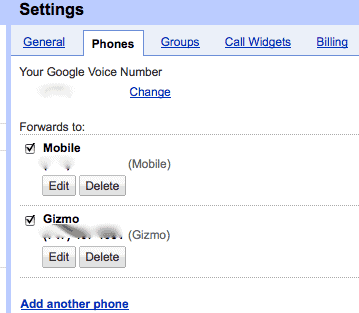
  4. In Google Voice, click “Settings”, and then “Phones.”
  5. Click “Add Another phone” and paste the SIP number from Gizmo (again, only what’s before the @ Sign) into the box.
  6. Name the number “Gizmo” or whatever you want, and then Save it.
Gizmo
Now, to make calls:
  1. Open Google Voice, and click “Call”
  2. Enter the number you want to call
  3. Make sure the Gizmo phone (whatever you called it) is selected as the “Phone to Ring”
  4. Click “Connect”
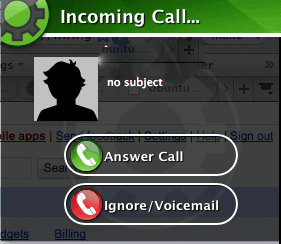
  5. You’ll get a pop-up from Gizmo, with your Google Voice number on the caller ID. Answer it!
  6. Google Voice will automatically dial and connect the other person, and you’ll be chatting from your computer!
The whole process only takes about five minutes, and doesn’t cost a nickel. Because you’re using a SIP number, all the data is transmitted over your cable connection rather than your phone network. That means you’ll need fast Internet to really make this work, but also means it doesn’t cost a thing!
I’m not sure how long this will be around (I’m sure carriers won’t be fans), but for now it’s a fantastic solution for making calls directly from your computer.

How I Make Free Calls from PC to Mobile Anywhere in the world

You can now make free calls from your pc to any mobile in the world.All you need is a Yahoo messenger,a mic and a decent internet connection.I’m now using this free call method for over a month now and the great thing is that, this trick can be used to make unlimited call to mobiles all over the world and not limited to United states.It even works to make free local mobile calls in India:)

So how do we make a call from pc to mobile phone for free.

Install Yahoo messenger,incase you don’t have it (go for the latest one which have voice support)
Sign into your yahoo messenger.
Configure your microphone and headset(don’t use speakers as it cause disturbances)
Inside your Yahoo messenger dial 18003733411 and press enter(as shown in figure).
free call to mobile with yahoo messenger

Now a small window pops up like the one shown below.
 calling for free
An operator greets you with a recorded welcome message along with an advertisement and asks you to select one of the Free411 service.Just hear the services options until they say the last one as “Free Call”.When you hear this,don’t press any number on your keyboard and instead SAY “Free call” loudly on your microphone connected to your PC.
After this voice message is detected by their system ,they will run a short advertisement of their sponsor and make sure you don’t press any number at this time.
WAIT UNTIL YOU HEAR THIS MESSAGE “Please dial the phone number country code first,don’t forget to dial 1 for north america”
After you hear this message ,immediately dial the destination number of your choice along with the country code.(eg for north america it’s 1 and for india it’s 91)

 dailpad-yahoo calling time shown
Your call will get connected and you can talk for 7 minutes continuous for free.When it gets disconnected, repeat the same procedure again.You can make multiple and unlimited calls with this service.
It was never easy to make a free international call like this before.
So what’s the catch?
FREE411 service toll-free number is based in USA.This company gets paid for the advertisements from sponsors.
Are there any limits on the number of call which we can make?
No.There is no limit on the number of free calls which can be made through this system.
So enjoy this trick to make free international and local calls and make sure you don’t abuse the system.


 important

If the line is BUSY just simply disconnect the yahoo and get back on again and it will works fine.
They don't offer Free call in some countries and I don't know why :D

Free calls to American Mobile/Phone number

CallingAmerica is a new web based service which allows you to make calls to america without charging you a single penny. It requires you to view a short ad before you place the call.Unregistered users can make calls of up to two minutes; registration — which is also free — gives you unlimited calls of up to 15 minutes.
free-mobile-phone-calls-to-america-us

CallingAmerica is completely web supported and you dont need to download any software to work with it . All you need is a working broadband internet connection.CallingAmerica works with PC and Mac ,so you can enjoy free calls if you are working on any of the OS.

WiMobile SIP Unlimited free calls to India, Italy, USA, China, United Kingdom from mobile and PC

It has been a long time since we have published about any 100% unlimited free calling service. Today we will discuss about WiMobile.com which is offering free calling to Italy, USA, China, United Kingdom & India. Read on for details.

WiMOBILE is a brand of LiLiumTel Srl. Main features of WiMobile are -
  • Free calling between All WiMobile users
  • User over 3G or WiFi
  • SIP based system ensures high quality voice
  • Unlimited free calling offer till 15 Sept, no purchase required
  • Available for Android, iPhone, Blackberry, Symbian and windows mobile phone.
To install WiMobile on your mobile, Visit WiMobile Download Page

How to use WiMobile service
  • Visit WiMobile.com & Sign up for a free account. (Give Valid email Id)
  • Check your email for Account activation email and confirm it
  • You will get a second email containing your user id and password
You can use these credentials to login using SIP dialer or WiMobile application.

How to configure WiMobile on your PC SIP (How to use WiMobile free calling on PC)
  • Download any SIP client.
  • Configure with below settings
  • Server SIP.WIMOBILE.IT
  • User name - you got in email
  • password - you got in email
  • Dial the number in international format eg for India +91 Mobile number
Now you can enjoy free calling to below destination -
Italy (Fixed)
USA (Fixed - Mobile)
China (Fixed - Mobile)
United Kingdom (Fixed)
India (Fixed - Mobile)


Enjoy....

Make Free Calls on your iPhone with Google Voice and Fring


Make free calls on your iPhone with Fring and Google Voice.
If you have a Google Voice account, you can make free VoIP calls on your iPhone. You’ll need to sign up for an account at Gizmo.com and download the free Fring app for your iPhone, but after that you’re done. You can make free outgoing calls to (up to three minutes) and receive unlimited incoming calls through Google Voice.
Hit the jump for instructions.


Ingredients

To do this you’ll need the following:
The following are optional but will optimize your experience (though Apple will hate you for it):
  • jailbroken iPhone
  • Backgrounder
  • 3g unrestrictor

Sign Up for Gizmo

All you need from Gizmo is the VoIP part of the puzzle. You don’t need to download the Gizmo desktop client, but you will need to change some of your settings.
Gizmo
When you’ve signed up for Gizmo, login to your account and turn Google Voice on. Add your Google Voice account number and you’re set. On your way out, be sure to grab your Gizmo number, which is two headings below in the Account Overview section. You’ll see a heading called SIP Number. Copy it. We’ll need to add it as a phone in Google Voice.

Set up Google Voice

Navigate to your Google Voice settings and click on the phones tab. At the bottom of the tab is an add another phone link. Click it and select Gizmo as the phone type from the drop down menu.
GoogleVoice
Once you’ve added your Gizmo number, it’s time to open up Fring on the iPhone.

Set Up Fring

Open up your Fring app and click on the SIP selection in the Add-ons menu. Use the Gizmo option to login to your account.
fring
Enter your Gizmo credentials and you’re set to make calls with Google Voice on your iPhone. Fring allows you to select contacts from your iPhone and hit SIP to dial. You’ll need to be on a wifi network to make outgoing calls, and you’re limited to 3 minutes, but you can receive incoming calls and talk for as long as you want. The incoming caller just needs to dial your Google Voice number and you need to disable Google Voice from forwarding your calls to your iPhone phone number.

Always Available

push1
Fring now has push notifications so you can be notified when someone is trying to reach you. It isn’t the most reliable way to take incoming phone calls, but it’s the only way for an un-jailbreaked iPhone to handle incoming calls without having the Fring app open constantly. So this system isn’t dependable for switching to VoIP just yet, but you can make 3 minute calls for free and have your friends call you back for unlimited interaction time.

Either Way, a Smart Move

Using this system of Google Voice->Gizmo->Fring will help you cut down on your minutes, and it’s just the thing to keep you connected when you’ve run out. Jailbreaking your phone allows you to keep Fring open in the background to receive calls, and it also lets you wander off of wifi. Using the 3g network for VoIP means you can lower you minute plan to nil. All you need is data. Isn’t that a Beatles song?

Free International Calls From Landline or Mobile

Do you want a landline access number to make free international calls?
As long as you have landline calls as part of your phone package then you can use your landline minutes and make free international calls.
You can make a 5 minute free international call every 1 hour …Scroll down for instructions

DAILY PASSWORD


PASSWORD WILL CHANGE EVERYDAY – SIGN UP TO GET AN EMAIL/TXT WITH DAILY PASSWORD
Instructions :
Dial 0121 314 8447 or 01254 368969and you will hear welcome message saying please dial the number you wish to connect to now
Enter *0112200 and press hash

After 10 seconds you will hear please enter password followed by pound/hash key
Enter 5678 and then press # button ( password changed  15 May – SIGN UP TO TO GET NEW PASSWORD

Then you will hear dial tone :) enter 0092etc and press hash DO NOT PRESS DIAL or CALL BUTTON AGAIN
UPDATE – YOU CAN ONLY CALL INTERNATIONAL LANDLINES – Make a test call and comment here or on facebook.
Any questions or comments go to http://www.facebook.com/accessnumbers
This service is provided thanks to VOIP providers and the Internet.
35 Albania 370 Lithuania
1684 American Samoa 352 Luxembourg
376 Andorra 853 Macau
126 Anguilla Antigua 389 Macedonia
54 Argentina 60 Malaysia
61 Australia 356 Malta
43 Austria 167 Mariana Isl
1242 Bahamas 596 Martinique
973 Bahrain 230 Mauritius
880 Bangladesh 26 Mayotte
1246 Barbados 52 Mexico
32 Belgium 377 Monaco
1441 Bermuda 976 Mongolia
591 Bolivia 1664 Montserrat
55 Brazil 212 Morocco
1284 British Virgin Isl 977 Nepal
673 Brunei 31 Netherlands
359 Bulgaria 64 New Zealand
257 Burundi 1670 N Mariana Isl
855 Cambodia 47 Norway
1343 Canada 92 Pakistan Isl/Kar/Lahore
56 Chile 507 Panama
86 China 595 Paraguay
6724 Christmas island 51 Peru
6722 Cocos islands 48 Poland
57 Colombia 351 Portugal
506 Costa Rica 1939 Puerto Rico
385 Croatia 26 Reunion
357 Cyprus 40 Romania
420 Czech republic 7 Russia
45 Denmark 1 St Kitts St Lucia St Vincnt
1809 Dominican Rep 378 San Marino
372 Estonia 966 Saudi Arabia
298 Faeroes Islands 248 Seychelles
358 Finland 65 Singapore
33 France 1721 St Maarten
995 Georgia 421 Slovakia
49 Germany 386 Slovenia
350 Gibraltar 27 South Africa
8812 Global Mobile Satellite 8270 South Korea
881890 Globalstar Satellite 34 Spain
30 Greece 947 Sri Lanka
1473 Grenada 268 Swaziland
590 Guadeloupe 46 Sweden
1671 Guam 41 Switzerland
852 Hong Kong 886 Taiwan proper
36 Hungary 66 Thailand
354 Iceland 1868 Trinidad Tobago
91 India 90 Turkey
62 Indonesia 1649 Turks Caicos
88238 Int’l Networks Ellipso 44 United Kingdom
883 Inum VoIP 598 Uruguay
964 Iraq 1 USA
353 Ireland 1907 USA Alaska
972 Israel 1808 USA Hawaii
39 Italy 1800 USA Toll free
1876 Jamaica 1340 US virgin islands
81 Japan 99871 Uzbekistan Tashkent
962 Jordan 379 Vatican city state
7 Kazakhstan 58 Venezuela
965 Kuwait 84 Vietnam
996 Kyrgyzstan 883 Voxbone VoIP
856 Laos 260 Zambia
371 Latvia 259 Zanzibar

Make Free Internet Phone Calls Copyright © 2011 -- Template created by O Pregador -- Powered by Blogger